HOME Knowledge Base Change Chrome Language Chrome Browser Language Chrome Language Settings Default Language Chrome Set Chrome Language

CHANGE CHROME LANGUAGE.ZIP

My chrome browser is annoying me by Language - How do I change the default language?

My chrome browser is annoying me by Language - How do I change the default language?  

updated at   8,337  
Now a days,many website automatically detect language user use,and display the necessary information based on that language.And this is making me feel painful.I had some research how do I set the default language in my Google Chrome Browser,and foud a solu...


My chrome browser is annoying me by Language - How do I change the default language?

JK1982 
Created at
Updated at  

  8,338   0   0  

Now a days, many website automatically detect language user use, and display the necessary information based on that language. And this is making me feel painful.

I had some research how do I set the default language in my Google Chrome Browser, and foud a solution to set that language.

I learned that mine was based on the OS Whenever I browse new website, 

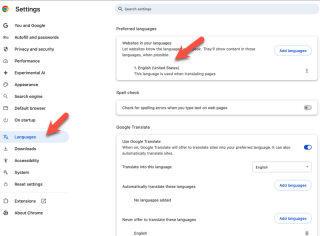
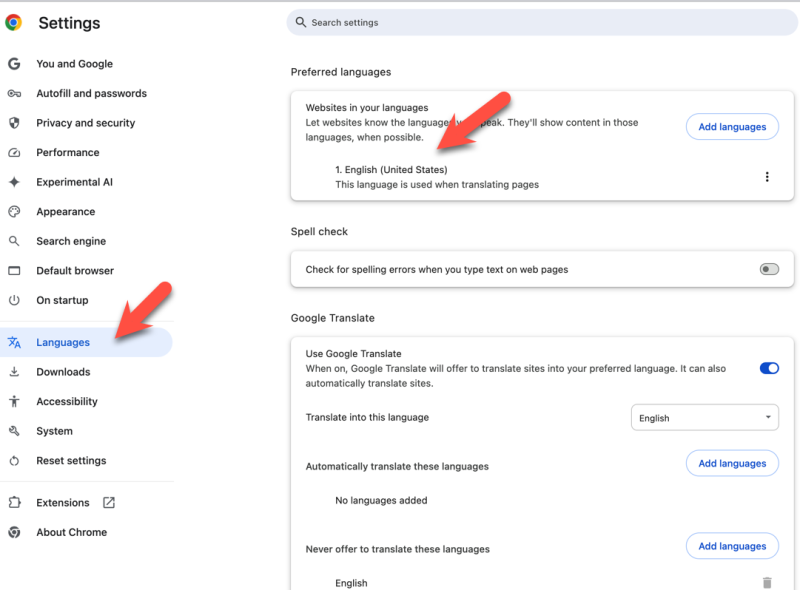
To change your Chrome browser's default language on your laptop → open Chrome → click the three dots in the top right corner → select "Settings" → navigate to "Languages" on the left side; under "Preferred languages" → choose the language you want to use and select "More" to set it as the display language if needed
My chrome browser is annoying me by Language - How do I change the default language?


Here's associated data for your Chrome browser language issue, combined with internet information:

  • Automatic Language Detection: Many websites use geolocation and browser settings to detect your language, making it difficult to control what language you see. This is a common source of frustration for users.
  • Other Language Settings: You might need to change the language settings of your operating system (Windows, macOS, Linux) to ensure consistency across your computer.
  • Website-Specific Language Settings: Some websites allow you to manually select a language. Look for language options in their menus, usually in the footer or top right corner.
  • Chrome Extension for Language Change: There are Chrome extensions available that let you quickly switch languages on websites. These extensions often offer additional features like translation.
  • Consider Using a VPN: A Virtual Private Network (VPN) can change your perceived location, potentially influencing the language detection on websites.


Tags: Change Chrome Language Chrome Browser Language Chrome Language Settings Default Language Chrome Set Chrome Language Share on Facebook Share on X

◀ PREVIOUS
Snack that makes my mouth happy when winter comes from the U.S - Hot Pockets

▶ NEXT
The difference between Equation and Formula

  Comments 0
OTHER POSTS IN THE SAME CATEGORY

US National Holiday in 2026

(created at )

Urban planning and growth from a historical perspective

(created at )

GGIS: The Roots of Visualizing Geographic Information

(created at )

Did you get Selective Service System(SSS) Form 3C?

(updated at )

What is Model Context Protocol (MCP)? How to build AI Agents?

(updated at )

Life Quotes from Google CTO Will Grannis emphasizes the importance of data and the problem definition

(updated at )

Life Quotes from Netflix CTO Elizabeth Stone in 2023

(updated at )

Eveything you tell HR is confidential

(updated at )

The difference between Equation and Formula

(created at )

Snack that makes my mouth happy when winter comes from the U.S - Hot Pockets

(updated at )

20+ Polite email greetings for the Smooth Conversation

(updated at )

Functional Importance of The Foster Families in the US

(updated at )

El Niño and La Niña

(updated at )

How do Grass and Trees Grow?

(updated at )

Mastering Taekwondo Board Breaking: Techniques, Types, and Proper Usage

(created at )

Why Nike Card Wallets Are a Smart Buy for the Stylishly Practical

(updated at )

Unlocking the Basics: The Concept of Teaching Taekwondo

(updated at )

Mastering the Interview: Essential Techniques for Landing a Tech Summer Camp Role

(updated at )

Why Google Crawler Isn't Indexing Your Blog: Common Issues and Solutions

(updated at )

Why DNS Blocking of Illegal Sites is Essential for a Safer Internet

(updated at )

Impact in the third party cookie on web browser

(updated at )

The Green Path Forward - Embracing Sustainability through Recycling

(updated at )

Clack Attack - Embracing the Joyful Chaos of Mechanical Keyboards

(updated at )

Taekwondo Tornado Kick Tutorial

(updated at )

UPDATES

Harness vs. OpenClaw: Two Very Different "Agents"

(updated at )

Clean Python Environments: The Power of venv vs. Docker

(updated at )

What is Docker? Why is Docker also useful in a development environment?

(created at )

UIUC 2026-2027 Academic Calendar

(updated at )

How to Build Llama 3 AI Apps with Python: Setup & User Prompts

(updated at )

Open-Source LLMs: The AI Revolution

(updated at )

Resume 2.0: Leveling Up for My First Software Gig

(created at )

Not everyone will understand what this man just did

(created at )

UIUC Dorm Guide: Find Your Perfect Fit !!

(updated at )

Unpacking IU's Shopper

(created at )

Jackie Chan's Police Story: The Action Masterpiece

(updated at )

The IVE Story: Identity, 'I AM' Charts, and Influence

(updated at )

Tech Visionaries who graduated at UIUC - You are the Next Turn

(updated at )

Open Databases for Sex Crime Occurrences in the U.S.

(updated at )

Automatically copy text to the clipboard when dragging the mouse in the Cursor

(updated at )

My First Day at University of Illinois-Urvana Champaign

(updated at )

Sand, Sea, and a Splash of Fun at Newport Beach: A Family Adventure

(updated at )

Sun, Rocks, and Adventure: A Day at Joshua Tree National Park

(updated at )

Sipping the Stars: My Starbucks Adventure

(updated at )

Exciting explore at Sequoia National Park

(updated at )

My Life Shot at Death Valley

(updated at )

Ip Man fights with Muay Thai Master

(created at )

Mad Clown - Don't Die

(created at )

How to get Student Enrollment and Degree Verification at UIUC

(updated at )

LAX Thanksgiving Rush: A Joyful Reunion

(updated at )

ZO ZAZZ(조째즈) - Don`t you know (모르시나요) (PROD.ROCOBERRY)

(updated at )

FISHINGIRLS Unleashes Energetic EP 'Funiverse' Featuring Signature Track 'Fishing King'

(updated at )

10CM - To Reach You (너에게 닿기를)

(updated at )

Feeling weak? Transform yourself at the UIUC ARC!

(updated at )

BOYNEXTDOOR - If I Say I Love You

(updated at )

The Future of Software Engineer - AI Engineering

(updated at )

G Dragon x Taeyang (Eyes Nose Lips, Power, Home Sweet Home, GOOD BOY) - LE GALA PIÈCES JAUNES 2025

(updated at )

Lie - Legend song by BIGBANG

(updated at )

Why ROLLBACK is useful when you work with Google Gemini CLI?

(created at )

Reimbursement after Vaccination at McKinley Health Center

(created at )

Gemini CLI makes a Magic! Time to speed up your app development with Google Gemini CLI!

(created at )

Common Questions from UIUC school life in terms of CS Program

(created at )

UIUC Immunization Compliance

(created at )

LEE CHANHYUK's songs really resonate with my soul - Time Stop! Vivid LaLa Love, Eve, Endangered Love ...

(created at )

LEE CHANHYUK - Endangered Love (멸종위기사랑)

(created at )

Cupid (OT4/Twin Ver.) - LIVE IN STUDIO | FIFTY FIFTY (피프티피프티)

(created at )

Common methods to improve coding skills

(created at )

US National Holiday in 2026

(created at )

BABYMONSTER “WE GO UP” Band LIVE [it's Live] K-POP live music show

(created at )

BLACKPINK - ‘Shut Down’ Live at Coachella 2023

(created at )

JENNIE - like JENNIE - One of Hot K-POP in 2025

(created at )

BABYMONSTER(베이비몬스터) - DRIP + HOT SOURCE + SHEESH

(created at )

Common Naming Format in Software Development

(created at )

In a life where I don't want to spill even a single sip of champagne - LEE CHANHYUK - Panorama(파노라마)

(created at )

Countries with more males and females - what about UIUC?

(created at )