Bootstrap vs. Tailwind CSS: Origins, Features, Pros & Cons, and How to Choose the Right Framework

JK 2002 
Created at  
15 0 0

Why Compare Bootstrap and Tailwind CSS?

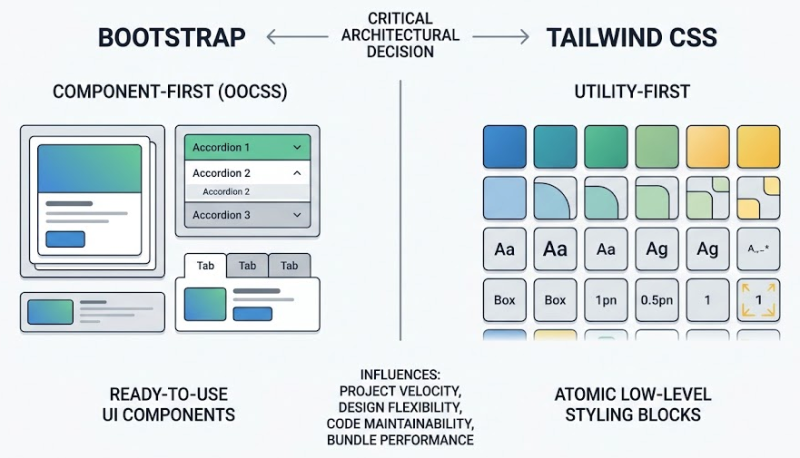
In modern web development, choosing the right CSS framework is a critical architectural decision that directly influences project velocity, design flexibility, code maintainability, and bundle performance.

Bootstrap and Tailwind CSS represent the two dominant, yet fundamentally opposing, paradigms in styling web applications:

  • Bootstrap follows a Component-First (Object-Oriented CSS) approach, providing pre-designed, ready-to-use UI components.
  • Tailwind CSS follows a Utility-First approach, offering atomic low-level styling blocks that developers compose directly in their markup.


Comparing these two frameworks helps developers and technical leads select the tool that best aligns with their team's design requirements, technical expertise, and project scale.
 

Bootstrap vs. Tailwind CSS: Origins, Features, Pros & Cons, and How to Choose the Right Framework


Birth Background and History

1. Bootstrap

Background

Bootstrap was created in mid-2010 at Twitter by developers Mark Otto and Jacob Thornton. Prior to Bootstrap, Twitter developers used various in-house libraries to style tools, leading to high inconsistency, maintenance burdens, and onboarding friction. Bootstrap was initially developed as an internal standard called "Twitter Blueprint" to solve these internal alignment issues.


History & Milestones

  • 2011 (Release): Open-sourced in August 2011. It quickly became the most popular CSS framework on GitHub due to its user-friendly grid system.
  • 2012 (v2.0): Added a responsive 12-column grid system, making mobile-responsive design mainstream.
  • 2013 (v3.0): Redesigned with a Mobile-First strategy, catering to the booming smartphone market.
  • 2018 (v4.0): Rewritten to use Flexbox under the hood, introducing rewritten utilities and dropping support for older IE versions.
  • 2021 (v5.0): Dropped its dependency on jQuery entirely in favor of vanilla JavaScript, switched to native CSS custom properties (variables), and improved modularity.


2. Tailwind CSS

Background

Tailwind CSS was created by Adam Wathan around 2017. Wathan noticed that while building complex web application interfaces, writing traditional custom CSS classes (such as BEM notation) led to massive, bloated stylesheets, frequent file-switching, and continuous naming fatigue ("What do I name this wrapper div?"). He envisioned an atomic CSS engine that would allow styling interfaces rapidly without leaving the HTML/JSX files.


History & Milestones

  • 2017 (Inception): Released as an open-source side project born out of Wathan's experimentations in utility-first CSS patterns.
  • 2019 (v1.0): Official major release with a robust configuration engine (tailwind.config.js) allowing custom design system definitions.
  • 2020 (v2.0): Added dark mode support, an expanded color palette, and initial experimental Just-In-Time (JIT) capabilities.
  • 2021 (v3.0): Introduced the JIT compiler as the standard engine, enabling dynamic arbitrary value generation (e.g., w-[123px]) and significantly reducing build speeds and bundle sizes.
  • 2024 (v4.0 Alpha/Beta Era): Shifted toward high-performance Rust-based engine architecture (Project Oxide) for ultra-fast compilation.


Features, Pros, and Cons

1. Bootstrap

Bootstrap focuses on providing complete, pre-styled UI components out of the box.


Key Features

  • Pre-built UI Components: Includes buttons, modals, dropdowns, navbars, and accordions out of the box.
  • 12-Column Responsive Grid: Intuitive grid system using container, row, and col classes based on Flexbox.
  • Built-in JavaScript Functionality: Native vanilla JS plugins for interactive UI elements (modals, tooltips, carousels).
  • Sass Customization: Highly customizable via SCSS variables and maps.


Pros

  • Rapid Prototyping: Build functional, aesthetically pleasing interfaces in minutes without writing custom CSS.
  • Low Initial Learning Curve: Developers with basic HTML/CSS knowledge can adopt it immediately.
  • Consistency: Ensures a unified interface across large teams without dedicated designers.
  • Rich Ecosystem: Abundant third-party templates and legacy support.


Cons

  • Generic Look ("Bootstrap Aesthetic"): Websites often look visually generic unless heavily customized.
  • Overriding Difficulty: Overriding default styles requires writing custom CSS that often fights with Bootstrap's specificity, leading to !important tags or bloated CSS overrides.
  • Unused CSS Overhead: Without strict tree-shaking setup, shipping unused component styles inflates bundle size.


2. Tailwind CSS

Tailwind CSS focuses on low-level utility classes that act as single-purpose styling instructions.


Key Features

  • Utility-First Methodology: Classes like flex, pt-4, text-center, and bg-blue-500 control layout and visual attributes directly.
  • JIT (Just-In-Time) Engine: Compiles CSS on-demand based on classes scanned in source files, resulting in tiny production CSS bundles (often < 10KB).
  • Design System Driven: Centralized control over colors, spacing, breakpoints, and typography via tailwind.config.js.
  • Arbitrary Values: Supports inline custom values dynamically (e.g., top-[17px], bg-[#123456]).


Pros

  • Ultimate Design Freedom: No opinions on visual appearance; craft unique, highly customized user interfaces.
  • No Class Naming Fatigue: Eliminates the need to invent semantic class names like .card-body-wrapper-inner.
  • High Performance: Unused CSS is automatically stripped out in production; styles scale with unique utility usage, not application size.
  • Seamless Developer Experience (DX): Write HTML/JSX and styles simultaneously without switching files.


Cons

  • Steep Learning Curve: Requires memorizing hundreds of utility class names and understanding fundamental CSS properties.
  • Cluttered HTML Markup: HTML files can become visually noisy with dozens of utility classes on a single element (e.g., class="flex items-center justify-between p-4 bg-white shadow-md rounded-lg").
  • No Default Component Styles: Buttons, modals, and navbars must be built from scratch or copied from component libraries (e.g., Tailwind UI, Shadcn UI).


 

Summary Comparison

AspectBootstrapTailwind CSS
ParadigmComponent-First (Pre-styled UI elements)Utility-First (Low-level building blocks)
Design FlexibilityOpinionated; requires overriding to look uniqueUnopinionated; custom designs are default
Primary Use CaseRapid MVP prototyping, internal dashboards, admin panelsCustom brand designs, modern complex web apps
CSS Output SizeModerate to Large (unless heavily pruned)Extremely Small (JIT compiler builds minimum CSS)
HTML ReadabilityClean HTML, semantic class names (class="btn btn-primary")Busy HTML, utility-heavy markup (class="px-4 py-2 bg-blue-500 text-white rounded")
Learning CurveLow (Easy to start immediately)Moderate (Requires memorizing utility classes and solid raw CSS knowledge)
InteractivityBuilt-in JS components includedRequires custom JS, or integration with React/Vue/Alpine.js


Facebook X
Comments 0
  1. Telemetry vs. Analytics: Understanding the Difference and Why It Matters

    157
  2. The Evolution and Production Reality of Agentic AI
    155
  3. Complete Guide to Building a Machine Learning Model
    276
  4. The Cybercab Transformation: From Autonomous Taxi to Mobile Base Station
    298
  5. Harness vs. OpenClaw: Two Very Different "Agents"
    878
  6. What is Docker? Why is Docker also useful in a development environment?
    576
  7. Open-Source LLMs: The AI Revolution
    697
  8. Open Databases for Sex Crime Occurrences in the U.S.
    667
  9. Automatically copy text to the clipboard when dragging the mouse in the Cursor
    2,483
  10. The Future of Software Engineer - AI Engineering
    902
  11. Why ROLLBACK is useful when you work with Google Gemini CLI?
    791
  12. Gemini CLI makes a Magic! Time to speed up your app development with Google Gemini CLI!
    932
  13. Common Naming Format in Software Development
    2,462
  14. Types of Memory and Storage
    7,395
  15. How to access websites blocked by ESNI and ECH settings with Firefox!
    10,138
Recently updated
  1. Telemetry vs. Analytics: Understanding the Difference and Why It Matters
    157
  2. The Evolution and Production Reality of Agentic AI
    155
  3. How to Activate or Waive Your UIUC Student Health Insurance
    230
  4. Complete Guide to Building a Machine Learning Model
    276
  5. My life cuts at Las Vegas during Thanksgiving day holiday
    7,358
  6. The Cybercab Transformation: From Autonomous Taxi to Mobile Base Station
    298
  7. Harness vs. OpenClaw: Two Very Different "Agents"
    878
  8. Clean Python Environments: The Power of venv vs. Docker
    753
  9. What is Docker? Why is Docker also useful in a development environment?
    576
  10. UIUC 2026-2027 Academic Calendar
    1,443
  11. How to Build Llama 3 AI Apps with Python: Setup & User Prompts
    752
  12. Open-Source LLMs: The AI Revolution
    697
  13. Resume 2.0: Leveling Up for My First Software Gig
    2,027
  14. Not everyone will understand what this man just did
    1,684
  15. UIUC Dorm Guide: Find Your Perfect Fit !!
    1,530
  16. Unpacking IU's Shopper
    697
  17. Jackie Chan's Police Story: The Action Masterpiece
    593
  18. The IVE Story: Identity, 'I AM' Charts, and Influence
    892
  19. Tech Visionaries who graduated at UIUC - You are the Next Turn
    1,137
  20. Open Databases for Sex Crime Occurrences in the U.S.
    667
  21. Automatically copy text to the clipboard when dragging the mouse in the Cursor
    2,483
  22. My First Day at University of Illinois-Urvana Champaign
    1,149
  23. Sand, Sea, and a Splash of Fun at Newport Beach: A Family Adventure
    8,076
  24. Sun, Rocks, and Adventure: A Day at Joshua Tree National Park
    8,150
  25. Sipping the Stars: My Starbucks Adventure
    9,553
  26. Exciting explore at Sequoia National Park
    7,611
  27. My Life Shot at Death Valley
    1,606
  28. Ip Man fights with Muay Thai Master
    891
  29. Mad Clown - Don't Die
    964
  30. How to get Student Enrollment and Degree Verification at UIUC
    4,613
  31. LAX Thanksgiving Rush: A Joyful Reunion
    888
  32. ZO ZAZZ(조째즈) - Don`t you know (모르시나요) (PROD.ROCOBERRY)
    1,074
  33. FISHINGIRLS Unleashes Energetic EP 'Funiverse' Featuring Signature Track 'Fishing King'
    933
  34. 10CM - To Reach You (너에게 닿기를)
    1,111
  35. Feeling weak? Transform yourself at the UIUC ARC!
    1,539
  36. BOYNEXTDOOR - If I Say I Love You
    1,146
  37. The Future of Software Engineer - AI Engineering
    902
  38. G Dragon x Taeyang (Eyes Nose Lips, Power, Home Sweet Home, GOOD BOY) - LE GALA PIÈCES JAUNES 2025
    872
  39. Lie - Legend song by BIGBANG
    7,782
  40. Why ROLLBACK is useful when you work with Google Gemini CLI?
    791
  41. Reimbursement after Vaccination at McKinley Health Center
    968
  42. Gemini CLI makes a Magic! Time to speed up your app development with Google Gemini CLI!
    932
  43. Common Questions from UIUC school life in terms of CS Program
    1,064
  44. UIUC Immunization Compliance
    1,159
  45. LEE CHANHYUK's songs really resonate with my soul - Time Stop! Vivid LaLa Love, Eve, Endangered Love ...
    1,054
  46. LEE CHANHYUK - Endangered Love (멸종위기사랑)
    1,053
  47. Cupid (OT4/Twin Ver.) - LIVE IN STUDIO | FIFTY FIFTY (피프티피프티)
    838
  48. Common methods to improve coding skills
    952
  49. US National Holiday in 2026
    867
  50. BABYMONSTER “WE GO UP” Band LIVE [it's Live] K-POP live music show
    949