Harness vs. OpenClaw: Two Very Different "Agents" | ||
| ||
| If you've been anywhere near AI Twitter lately, you've probably seen two open-source projects throwing off sparks: Harness (the
Here's an honest look at what each one actually is, how you'd install it, and how to think about which (if either) belongs in your workflow.
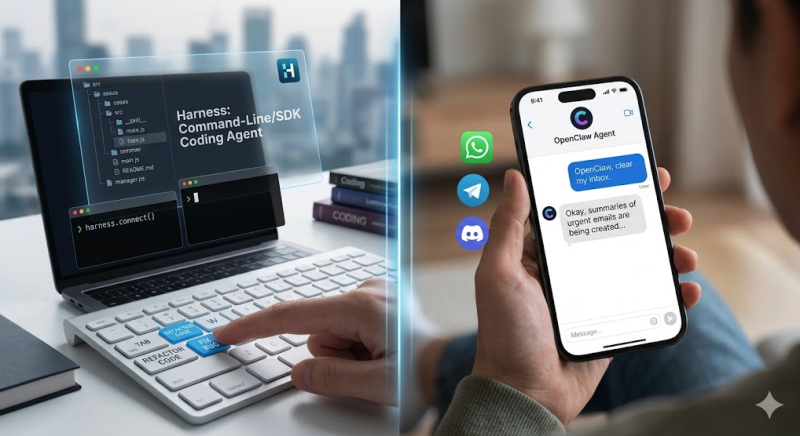
What is Harness?Harness is a coding agent — a command-line tool plus a Python SDK that drives an LLM through a read-edit-run loop inside your codebase. You point it at a repo, give it a task ("fix the auth bug," "refactor this module," "run the tests and fix what breaks"), and it works through the problem using a set of built-in tools: reading and writing files, running shell commands, searching code, fetching web pages, and spawning sub-agents for parallel work. Its main selling point is that it's model-agnostic. The same agent runs on Anthropic's Claude, OpenAI's GPT models, Google's Gemini, or a fully local model through Ollama — you switch with a single flag. That's a meaningful difference from agents that are welded to one provider. A few features worth calling out: permission modes that range from "ask before every change" to a full auto-approve "bypass" mode for CI; context compaction that summarizes the conversation when you approach the model's limit; an MCP client for connecting external tools like Jira or Slack; and a skills system where you teach it workflows by dropping a Markdown file in a config folder. If that last part sounds familiar, it's because the design borrows heavily from the conventions popularized by tools like Claude Code. A note on the benchmark claims. The project's README states that Harness scores 100% on "Harness-Bench" and outperforms Claude Code, OpenCode, and pi-mono. Take this with appropriate salt: Harness-Bench is the project's own eight-task benchmark, and a tool topping the test its authors wrote isn't independent evidence of anything. The repo is also young and small at the time of writing. The architecture looks reasonable and the feature list is real — but treat "state of the art" as a marketing claim, not a measured fact, until third-party benchmarks (it does support running SWE-bench) confirm it.
What is OpenClaw?OpenClaw is a personal assistant agent, and the framing is completely different. Instead of living in your terminal and editing code, it runs on your own machine (Mac, Windows, or Linux) and you talk to it through chat apps you already use — WhatsApp, Telegram, Discord, Slack, Signal, iMessage. You message it like a coworker and it does things: clears your inbox, manages your calendar, browses the web and fills out forms, runs shell commands, and remembers context across conversations. It's also model-flexible (Claude, GPT, or local models) and heavily extensible through community-built "skills" and plugins, with the agent able to write its own. The project was created by Peter Steinberger and has had a genuinely viral run; its creator has since joined OpenAI while the project continues as open source. The pitch, distilled: it's the "do things for me in the background" assistant that Siri was supposed to be, but open and running on hardware you control.
The real differenceThe cleanest way to see it:
They overlap only at the edges — both can run shell commands, both use the MCP ecosystem, both let you define skills in Markdown. But choosing between them as if they compete is a bit like choosing between a power drill and a personal assistant. If you're shipping software, Harness. If you want an always-on agent handling your messages and errands, OpenClaw. Plenty of people in both communities run both, pointing OpenClaw at coding tools like Harness or Claude Code when they want code written from their phone.
Installing them (and a serious caveat first)Both projects offer the same fashionable one-liner: I'd encourage you — and your readers — not to run either blindly. Piping a script straight from the internet into
Harness, the safer way: It requires Python 3.12+. Your API key lands in OpenClaw installs via npm (
So which should you use?Wrong question, most of the time. Decide what you're trying to automate:
Both are early-stage, both are open source, and both ask for a lot of trust in exchange for their power. That trade-off — capability now, security still catching up — is the real story with this generation of agents, and it's worth keeping front of mind no matter which one you reach for.
What about token consumption?This is the question everyone asks, and the honest answer is that the two tools can't be compared apples-to-apples on tokens — and you should be suspicious of anyone who claims otherwise. The reason is simple: they do different work. Token usage for any agent is driven by the size of the task, how much context gets loaded, how much conversation history is replayed, and which model is running. A coding task in Harness ("refactor this module") and an assistant task in OpenClaw ("check my email") aren't the same unit of work, so putting their token counts side by side tells you nothing meaningful. Neither project publishes usage figures, and inventing a comparison table would be worse than useless.
What you can do is measure each tool's real usage yourself, within its own domain. Both expose the numbers: Harness has built-in cost reporting. Inside the REPL, OpenClaw routes through your own API key, so its usage shows up in your provider's dashboard — the Anthropic Console or OpenAI usage page, depending on which model you connected. Run a task, then check the dashboard for the spend in that time window.
The "check my email" exampleWorth being clear about: this example only runs on OpenClaw. Harness is a coding agent — its tools are file read/write/edit, shell, search, and web-fetch. It has no email integration, so there's nothing to measure on the Harness side of an inbox task. On OpenClaw, a realistic way to measure it:
What drives the number, in rough order of impact: how many emails it actually reads (and how long they are), how much of its persistent memory and prior conversation gets replayed into context, and the model you chose — a frontier model like Claude Opus or GPT-5.2 will cost far more per run than a local Ollama model, which is effectively free on tokens but trades off quality and speed. If you want a genuinely useful comparison for readers, the right experiment is: pick one realistic task per tool's actual domain, run it on the same underlying model, and report the real
My experience: OpenClaw runs up tokens fastIn my own use, OpenClaw has been a heavy token consumer. That tracks with how it's built: persistent memory and conversation history get replayed into context on each turn, and tasks like reading an inbox pull a lot of raw text in. If you're on a frontier model, that adds up quickly. It's tempting to assume a coding agent like Harness would therefore be lighter — but I want to be careful here, because I haven't measured it, and the assumption doesn't really hold. Coding agents can be just as token-hungry, sometimes more: they load large files and whole codebases into context, replay them across turns, and spawn sub-agents that each carry their own context. Whether Harness uses fewer tokens than OpenClaw isn't something you can reason out from first principles — it depends entirely on the task, and the only honest way to know is to measure both. So treat "OpenClaw uses a lot of tokens" as my lived experience, not "Harness uses less" as a conclusion. If you've measured Harness's
Both projects are independent and not affiliated with the model providers they run on. Benchmark figures cited above are self-reported by the Harness project and were not independently verified for this post. | ||
| | ||
| |