What is Docker?Docker is an open-source platform that enables developers to build, ship, and run applications in a consistent and isolated environment called a container. It virtualizes the operating system, allowing you to package an application with all its dependencies (libraries, frameworks, configuration files, etc.) into a single, portable unit. 
Key characteristics of Docker and containers include: - Isolation: Each container runs in isolation from other containers and the host system. This means applications within one container won't interfere with applications or configurations in another.
- Portability: A Docker container image includes everything an application needs to run. This image can be moved and run on any machine that has Docker installed, regardless of the underlying operating system (Linux, Windows, macOS). This ensures that "it works on my machine" translates to "it works everywhere."
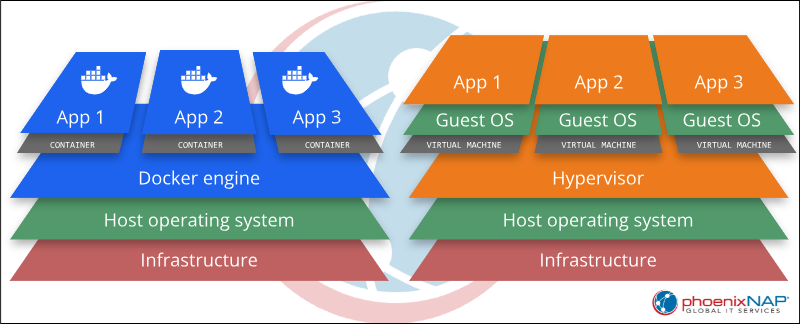
- Lightweight: Unlike traditional virtual machines (VMs) that virtualize an entire hardware stack and include a full guest operating system, Docker containers share the host OS kernel. This makes them significantly lighter, faster to start, and consume fewer resources.
- Consistency: Docker ensures that the environment your application runs in during development is identical to the one in testing, staging, and production, drastically reducing "works on my machine" issues.
- Efficiency: Containers enable efficient resource utilization and quicker deployment cycles.
The Closest Analogy: Shipping ContainersThe most fitting and widely recognized analogy for Docker is physical shipping containers. This comparison is not just a coincidence; it's what inspired the name "Docker" itself and perfectly encapsulates its core principles of standardization, isolation, and portability. 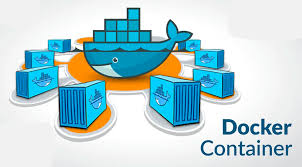
Why Shipping Containers?- Standardized Packaging: Just as a shipping container provides a uniform way to package vastly different goods (cars, electronics, grain, etc.) for transport, a Docker container offers a standardized way to package any application along with all its dependencies (code, runtime, libraries, settings).
- Isolation: The contents of one shipping container are completely isolated from another. Similarly, Docker containers provide process and resource isolation, meaning applications inside one container won't interfere with applications in another, even when running on the same host machine.
- Portability & Interchangeability: A standard shipping container can be loaded onto any ship, train, or truck equipped to handle them, regardless of what's inside or where it originated. Likewise, a Docker container is designed to run consistently across any environment that has Docker installed – from a developer's laptop to a testing server or a production cloud environment – ensuring "it works on my machine" translates to "it works everywhere."
- Efficiency: Shipping containers optimize global logistics by allowing efficient stacking and transport. Docker containers are lightweight and efficient because they share the underlying operating system kernel of the host machine, unlike virtual machines that package an entire OS. This reduces overhead and speeds up startup times.
- Separation of Concerns: The transport vehicle doesn't need to know the specifics of the cargo inside a shipping container, only how to move a container. Similarly, the host system running Docker doesn't need to worry about the specific dependencies or configurations of an application within a Docker container; it just needs to run the container.
Technical Comparison: Virtual Machines (VMs)While shipping containers provide an excellent analogy, from a purely technical standpoint, Docker is often compared to Virtual Machines (VMs) because they both aim to achieve application isolation and portability. However, they do so with fundamentally different approaches. 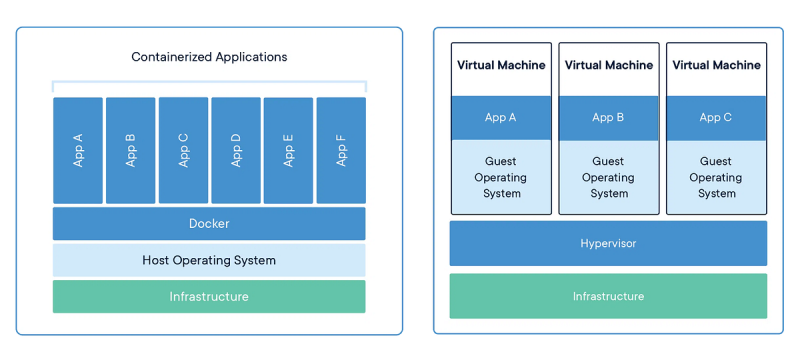
Docker vs. Virtual Machines- Granularity:
- VMs: Virtualize the entire hardware stack, with each VM running its own complete guest operating system (OS) on top of a hypervisor. This makes them heavier, slower to start, and consume more resources. (Think of it as each VM being a separate house).
- Docker Containers: Virtualize at the operating system level, sharing the host OS kernel. They only package the application and its direct dependencies, making them significantly lighter, faster to start, and more resource-efficient. (Think of it as each container being an apartment within a building, sharing the building's infrastructure).
- Isolation Level: Both provide strong isolation, but VMs achieve it through hardware virtualization, while Docker achieves it through OS-level virtualization (using Linux kernel features like namespaces and cgroups).
- Overhead: VMs have high overhead due to the full OS and virtualized hardware. Docker containers have minimal overhead, leveraging the host OS.
- Use Cases: VMs are ideal when you need to run multiple different operating systems on one physical machine, or when extreme isolation at the hardware level is paramount. Docker containers are ideal for packaging and deploying individual applications or microservices consistently across various environments that share the same underlying OS kernel, prioritizing speed, efficiency, and resource optimization.
In essence, while VMs provide hardware virtualization, Docker provides OS-level virtualization with a specific focus on application packaging and portability, making it a much lighter and faster solution for modern software development and deployment. Why is Docker also useful in a Development Environment?Docker offers significant advantages for developers, streamlining workflows and enhancing productivity: - Consistent Environments: Developers can create a standardized development environment using Docker. This ensures that every developer on a team is working with the exact same versions of databases, programming languages, libraries, and other dependencies, eliminating "it works on my machine" problems.
- Dependency Management: Docker simplifies the management of complex application dependencies. Instead of manually installing and configuring various software (e.g., specific versions of Node.js, Python, PostgreSQL, and Redis), developers can define these dependencies in a
Dockerfile and let Docker build the environment. - Environment Isolation: Each project can have its own isolated Docker environment. This prevents conflicts between different projects that might require different versions of the same software. For example, you can run a project requiring Python 2.7 and another requiring Python 3.9 simultaneously without conflicts.
- Easy Onboarding: New team members can get up and running quickly. Instead of spending hours or days setting up their local development environment, they can simply pull the Docker images and start coding.
- Local Testing and Replication: Developers can easily replicate production-like environments on their local machines for testing purposes. This helps catch environment-specific bugs earlier in the development cycle.
- Reproducibility: Docker makes it easy to reproduce bugs or test specific scenarios by quickly spinning up a specific version of an application and its dependencies.
- Simplified Tooling: Tools like Docker Compose allow developers to define and run multi-container Docker applications with a single command, making complex setups manageable.
Can I run multiple Dockers at the same time?This is one of Docker's fundamental features and a core aspect of its utility. 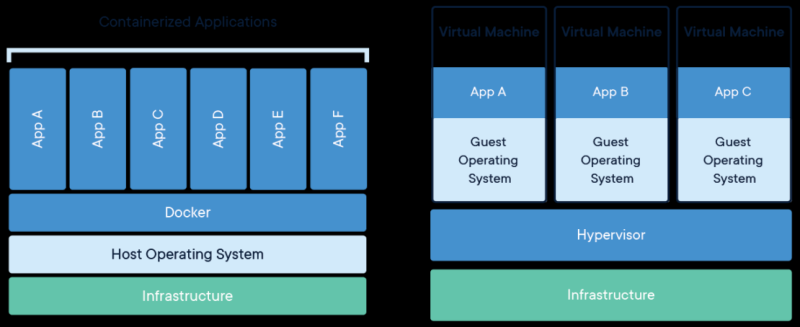
Here's how it works and why it's beneficial: - Isolation and Resource Management: Each Docker container runs in its own isolated environment. Docker manages the resource allocation (CPU, memory, network) for these containers, ensuring they don't directly interfere with each other's processes or file systems.
- Concurrent Applications: You can run multiple distinct applications, or multiple instances of the same application, side-by-side. For example, you might run:
- A web server (e.g., Nginx) in one container.
- A database (e.g., PostgreSQL or MySQL) in another container.
- A backend API service (e.g., Node.js or Python) in a third container.
- A frontend application (e.g., React) in yet another container.
- Multi-Container Applications (Docker Compose): For applications composed of multiple services, Docker Compose is often used. It allows you to define all the services, networks, and volumes for your application in a single
docker-compose.yml file, and then start, stop, and manage all containers as a single unit with simple commands like docker compose up. - Port Mapping: When running multiple containers that need to expose ports (e.g., web servers), Docker allows you to map internal container ports to different external host ports. For example, one web server might run internally on port 80 and be accessible on
localhost:8080, while another runs internally on port 80 and is accessible on localhost:8081. - Networking: Docker provides sophisticated networking capabilities, allowing containers to communicate with each other over virtual networks, even if they are isolated from the host's direct network access. This enables complex microservices architectures.
Running multiple Docker containers simultaneously is a standard practice for building and deploying modern, scalable applications. |