| Getting reimbursed by your insurance company after receiving a vaccination at McKinley Health Center at UIUC involves a few key steps. McKinley typically provides you with the necessary documentation, but you will be responsible for submitting the claim to your personal insurance provider. Actually it is not that simple unfortunately 😭 , but this is something that you should know to take your benefits. Here's a step-by-step guide: 1. At McKinley Health Center: Obtain Necessary Documentation- Pay for the Vaccination: When you receive your vaccination at McKinley, you will likely pay for it out-of-pocket at the time of service.
- Request an Itemized Receipt/Superbill: This is the most crucial document. Before you leave or shortly after, make sure to request:
- An itemized receipt that clearly shows the cost of the vaccination.
- A superbill (if available) which is a detailed receipt used by healthcare providers to list services rendered, diagnoses, and charges.
- Ensure the document includes:
- Your full name and date of birth.
- The date of service (when you got the shot).
- A clear description of the service (e.g., "Flu Vaccine," "TDAP vaccine").
- The CPT (Current Procedural Terminology) code for the vaccination. This is essential for insurance processing.
- The ICD-10 (International Classification of Diseases) code if applicable (less common for routine vaccinations but good to have if provided).
- The amount you paid.
- McKinley Health Center's name and address.
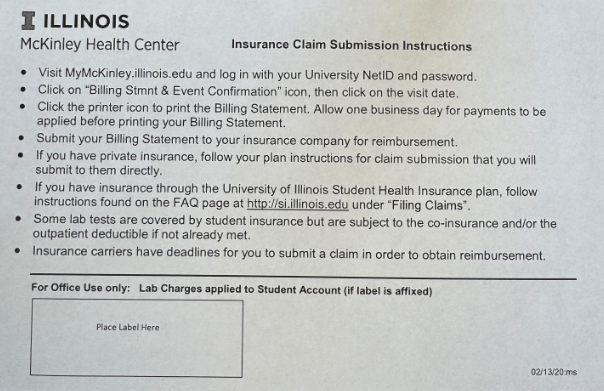
- For your information, below is what I got at McKinley Health Center after the vaccination:
I was able to get the statement (aka evidence for reimbursement) at Bill Stmt & Event Confirm and it looks like below in PDF format:
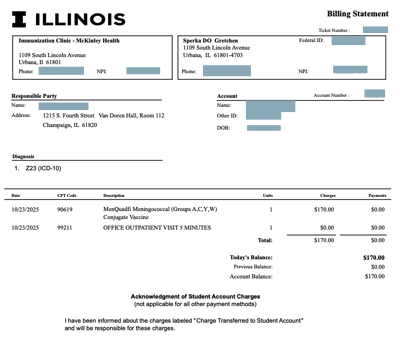
2. Contact Your Insurance Company- Understand Your Benefits: Before submitting, it's highly recommended to call the customer service number on your insurance card (or visit their website).
- Ask about coverage: Confirm if your plan covers the specific vaccination you received. Many preventive vaccinations are covered at 100% under the Affordable Care Act (ACA) without a deductible, but policies vary.
- In-network vs. Out-of-network: Ask if McKinley Health Center is considered "in-network" or "out-of-network" for your plan. This can affect the reimbursement amount.
- Reimbursement Process: Ask about their specific process for submitting claims for services paid out-of-pocket. They will tell you if you need a specific claim form.
- Submission Method: Inquire about their preferred method for submitting claims (online portal, mail, fax).
3. Prepare Your Reimbursement Claim- Obtain the Claim Form: Your insurance company will likely require you to fill out a "Medical Claim Form" (sometimes called a "Patient Reimbursement Form" or "Out-of-Network Claim Form"). You can usually download this from their website or request one to be mailed.
- Gather Documents:
- The completed claim form.
- The itemized receipt/superbill from McKinley.
- A copy of your insurance card (front and back).
- Any proof of payment if separate from the receipt.
4. Submit Your Claim- Review Everything: Before sending, double-check that all information on the claim form is accurate and matches the McKinley documentation. Make sure your policy number is clearly visible.
- Make Copies: Always make copies of everything you send for your records.
- Submit:
- Online Portal: If your insurer has an online portal, this is usually the fastest method. You'll typically upload scanned copies of your documents.
- Mail: Send all documents to the address provided by your insurance company for claims. Consider sending it via certified mail if you want to track delivery, though standard mail is often sufficient for smaller claims.
- Fax: If this is an option, ensure you get a confirmation of successful transmission.
5. Follow Up- Track Your Claim: Note the date you submitted the claim.
- Check Status: After a few weeks (ask your insurance company their typical processing time), you can call them to check the status of your claim.
- Explanation of Benefits (EOB): Once your claim is processed, your insurance company will send you an "Explanation of Benefits" (EOB). This document will detail what they covered, what they didn't, and why, and will indicate the amount they are reimbursing you.
- Reimbursement: The reimbursement check or direct deposit will follow the EOB.
Important Considerations:- Deductible: If you haven't met your insurance deductible, the reimbursement might first go towards satisfying that deductible.
- International Student Insurance (e.g., GeoBlue): If you are an international student, your UIUC-sponsored insurance (like GeoBlue) will have a specific claims process. Make sure to consult their member portal or contact their customer service directly for instructions and claim forms. They are generally very accustomed to handling reimbursements for services paid out-of-pocket by students.
- Keep Records: Maintain a file of all receipts, claim forms, and correspondence related to your reimbursement.
In my case, I use GeoBlue that provided my Dad's company and followings are the steps I did: - Visit https://bcbsglobalsolutions.com/employers-and-organizations/
- Click “Member Login” located on the top right
- Click “eClaims”
- Click “File an eClaim”
- Click “Paperless Form Submission”
- Select “Primary Member”, “Bank Wire Transfer or Ach Payment”, No, No
- Put/Check Basic Information (Address/Phone Number)
- Other Insurance: No
Invoiced Charges: Input Hospital Information if you haven't used 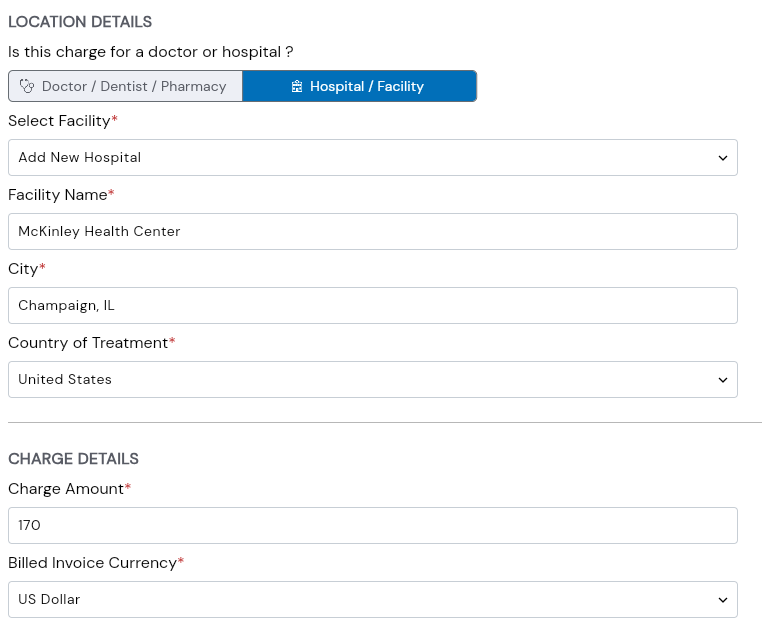
Visit Details - Condition or Diagnosis: OTHER - Other Condition or Diagnosis Description: <the detail in the statement> in my case MenQuadfi Meningococcal (Groups A,C,Y,W) Conjugate Vaccine - Service Description: OTHER - Other Service Description: Vaccination - Add Supporting Documents: The statement you downloaded at McKinley Health Center
- Input Reimbursement Details: Select Wire or Check
- Input Authorization Information
- Check the description
- Input your full name in “FULL NAME”
Click “Submit eClaim”
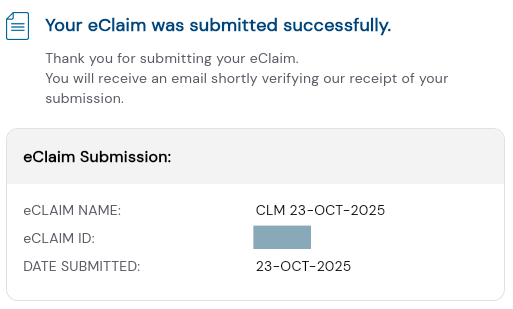 Boom!!! You are all set!!
I hope it helps. |