HOME Digital/Technology Wi-Fi Wi-Fi Extender Wi-Fi Repeater Wi-Fi Signal Wifi Wifi Extender Wifi Repeater Wifi Signal

WIFI SIGNAL.ZIP

Boost Your Wi-Fi Signal with a Wi-Fi Repeater

Boost Your Wi-Fi Signal with a Wi-Fi Repeater  

updated at   8,648  
In our fast-paced digital age, a strong and reliable Wi-Fi connection is essential for smooth internet browsing, streaming, gaming, and online communication. If you've ever experienced dead zones or weak signals in certain areas of your home or office, a W...


Boost Your Wi-Fi Signal with a Wi-Fi Repeater

JK1982 
Created at
Updated at  

  8,649   0   0  

In our fast-paced digital age, a strong and reliable Wi-Fi connection is essential for smooth internet browsing, streaming, gaming, and online communication. If you've ever experienced dead zones or weak signals in certain areas of your home or office, a Wi-Fi repeater might be the solution you need to extend your network range. In this blog post, we'll explore what a Wi-Fi repeater is, how it works, and provide you with step-by-step instructions on setting up and optimizing its performance.

What is a Wi-Fi Repeater?

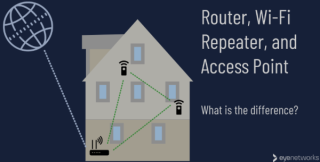
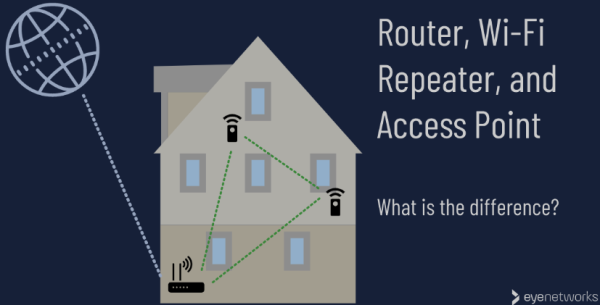
A Wi-Fi repeater, also known as a range extender, is a device designed to enhance and extend the coverage of your existing Wi-Fi network. It works by receiving the wireless signal from your router, amplifying it, and then rebroadcasting it to areas with weaker signal strength. Essentially, a Wi-Fi repeater helps eliminate dead zones and ensures a more consistent and reliable connection throughout your space.
Boost Your Wi-Fi Signal with a Wi-Fi Repeater

Choosing the Right Wi-Fi Repeater:

Before diving into the setup process, it's crucial to choose the right Wi-Fi repeater for your needs. Consider factors such as compatibility with your router, the range you need to cover, and the maximum data transfer speed. Look for reputable brands and read reviews to ensure you're investing in a reliable device.

Setting Up Your Wi-Fi Repeater:

  1. Placement is Key:
    Choose a central location between your router and the areas with weak signal coverage. This helps the repeater receive a strong signal from the router and effectively extend it to the desired areas.
  2. Power Up the Repeater:
    Plug in your Wi-Fi repeater and wait for it to power up. Most repeaters have indicator lights that will guide you through the setup process.
  3. Connect to the Repeater:
    Use a device (e.g., laptop, smartphone, or tablet) to connect to the Wi-Fi repeater's network. This usually involves selecting the repeater's network from the available Wi-Fi networks and entering the provided password.
  4. Access the Repeater's Settings:
    Open a web browser and enter the repeater's IP address (commonly found in the user manual). Log in using the default credentials and proceed to the setup wizard.
  5. Configure Repeater Settings:
    Follow the on-screen instructions to configure the repeater settings. This typically involves selecting your existing Wi-Fi network, entering the password, and setting up a new network name (SSID) for the extended network.
  6. Optimize Placement and Test:
    Fine-tune the repeater's placement for optimal performance. Test the connection in previously weak signal areas to ensure a noticeable improvement.


Tips for Optimal Performance:

  • Place the repeater away from obstructions like walls and electronic devices.
  • Regularly update the repeater's firmware for improved stability and security.
  • Consider a dual-band repeater for better performance in crowded Wi-Fi environments.
     

Conclusion:

A Wi-Fi repeater is a cost-effective and efficient solution for expanding your Wi-Fi coverage and eliminating dead zones. By following these steps and considering the tips for optimal performance, you can enjoy a seamless and robust wireless network throughout your home or office. Upgrade your connectivity today and say goodbye to Wi-Fi woes!


Tags: Wi-Fi Wi-Fi Extender Wi-Fi Repeater Wi-Fi Signal Wifi Wifi Extender Wifi Repeater Wifi Signal Share on Facebook Share on X

◀ PREVIOUS
if exist statement in DOS

▶ NEXT
Revolutionizing Cycling - The Magic of Self-Sealing Bicycle Tires

  Comments 0
OTHER POSTS IN THE SAME CATEGORY

Extended Range Electric Vehicle (EREV) helps to reduce charging inconvenience and revolutionize long-distance driving

(updated at )

When is the oil peak?

(updated at )

Obstacles you should overcome for AdSense Approval

(updated at )

WiFi connection is established, but internet is not available on my Microsoft Windows Laptop - how to make it work?

(updated at )

My windows memory usage is 51% even though I haven't ran any app - how to optimize?

(updated at )

Technical Secification for Schwinn Men's Trailway 700c/28" Hybrid Bike

(updated at )

Microsoft's On-Device AI: Revolutionizing Smart Technology and Redefining Innovation

(updated at )

ChatGPT Reset command and Ignore the Previous Response feature to have a Solid Result

(updated at )

ChatGPT Connectors makes the results Perfect as you expected

(updated at )

The difference between 403 and 404 in HTTP

(updated at )

Elon Musk Refutes Reports on Tesla's Low-Cost EV Plans: What's Really Happening?

(updated at )

Step-by-Step Guide: Developing Simple Games in Unity for Beginners

(updated at )

Unleashing Creativity with Unity: A Comprehensive Game Development Powerhouse

(updated at )

How solar chargers can power your home and wallet in Orange County

(updated at )

Revolutionizing Cycling - The Magic of Self-Sealing Bicycle Tires

(updated at )

if exist statement in DOS

(created at )

Microsoft Windows commands frquently used

(updated at )

GPL aims to protect the four freedoms of free software

(updated at )

Key Features of the Apache License

(updated at )

The main function of a web cache in a web browser

(created at )

I don't like Apple Vision Pro - Elon Musk's honest review

(created at )

Google Map Link Logic

(updated at )

What is the role of README.md at GitHub/GitLab Repository?

(updated at )

Semantic Network - a method of expressing knowledge based on a mesh structure

(updated at )

What is Google Analytics?

(updated at )

What is OTT(Over The Top)?

(created at )

What is a smart TV?

(updated at )

What is a dry battery, lithium battery, and why do mobile phones use lithium batteries instead of dry batteries?

(created at )

What is Sitemap? Why do we need it?

(updated at )

Naver Papago - multilingual machine translation service

(updated at )

UPDATES

Harness vs. OpenClaw: Two Very Different "Agents"

(updated at )

Clean Python Environments: The Power of venv vs. Docker

(updated at )

What is Docker? Why is Docker also useful in a development environment?

(created at )

UIUC 2026-2027 Academic Calendar

(updated at )

How to Build Llama 3 AI Apps with Python: Setup & User Prompts

(updated at )

Open-Source LLMs: The AI Revolution

(updated at )

Resume 2.0: Leveling Up for My First Software Gig

(created at )

Not everyone will understand what this man just did

(created at )

UIUC Dorm Guide: Find Your Perfect Fit !!

(updated at )

Unpacking IU's Shopper

(created at )

Jackie Chan's Police Story: The Action Masterpiece

(updated at )

The IVE Story: Identity, 'I AM' Charts, and Influence

(updated at )

Tech Visionaries who graduated at UIUC - You are the Next Turn

(updated at )

Open Databases for Sex Crime Occurrences in the U.S.

(updated at )

Automatically copy text to the clipboard when dragging the mouse in the Cursor

(updated at )

My First Day at University of Illinois-Urvana Champaign

(updated at )

Sand, Sea, and a Splash of Fun at Newport Beach: A Family Adventure

(updated at )

Sun, Rocks, and Adventure: A Day at Joshua Tree National Park

(updated at )

Sipping the Stars: My Starbucks Adventure

(updated at )

Exciting explore at Sequoia National Park

(updated at )

My Life Shot at Death Valley

(updated at )

Ip Man fights with Muay Thai Master

(created at )

Mad Clown - Don't Die

(created at )

How to get Student Enrollment and Degree Verification at UIUC

(updated at )

LAX Thanksgiving Rush: A Joyful Reunion

(updated at )

ZO ZAZZ(조째즈) - Don`t you know (모르시나요) (PROD.ROCOBERRY)

(updated at )

FISHINGIRLS Unleashes Energetic EP 'Funiverse' Featuring Signature Track 'Fishing King'

(updated at )

10CM - To Reach You (너에게 닿기를)

(updated at )

Feeling weak? Transform yourself at the UIUC ARC!

(updated at )

BOYNEXTDOOR - If I Say I Love You

(updated at )

The Future of Software Engineer - AI Engineering

(updated at )

G Dragon x Taeyang (Eyes Nose Lips, Power, Home Sweet Home, GOOD BOY) - LE GALA PIÈCES JAUNES 2025

(updated at )

Lie - Legend song by BIGBANG

(updated at )

Why ROLLBACK is useful when you work with Google Gemini CLI?

(created at )

Reimbursement after Vaccination at McKinley Health Center

(created at )

Gemini CLI makes a Magic! Time to speed up your app development with Google Gemini CLI!

(created at )

Common Questions from UIUC school life in terms of CS Program

(created at )

UIUC Immunization Compliance

(created at )

LEE CHANHYUK's songs really resonate with my soul - Time Stop! Vivid LaLa Love, Eve, Endangered Love ...

(created at )

LEE CHANHYUK - Endangered Love (멸종위기사랑)

(created at )

Cupid (OT4/Twin Ver.) - LIVE IN STUDIO | FIFTY FIFTY (피프티피프티)

(created at )

Common methods to improve coding skills

(created at )

US National Holiday in 2026

(created at )

BABYMONSTER “WE GO UP” Band LIVE [it's Live] K-POP live music show

(created at )

BLACKPINK - ‘Shut Down’ Live at Coachella 2023

(created at )

JENNIE - like JENNIE - One of Hot K-POP in 2025

(created at )

BABYMONSTER(베이비몬스터) - DRIP + HOT SOURCE + SHEESH

(created at )

Common Naming Format in Software Development

(created at )

In a life where I don't want to spill even a single sip of champagne - LEE CHANHYUK - Panorama(파노라마)

(created at )

Countries with more males and females - what about UIUC?

(created at )