WiFi connection is established, but internet is not available on my Microsoft Windows Laptop - how to make it work?

JK1982 
Created at
Updated at  

  7,000   0   0  

You should read this carefully if you faced a situation that your Microsoft Windows Laptop like below.

The symptom is like below

  • All other devices at home are working fine except mine
  • Sometimes internet is connected and working normally, but the connection is not persisted - meaning frequently disconnected.

First, make sure your WiFi connection is established. You can see the WiFi icon in the taskbar showing that you are connected to the network. However, even if it shows a connection, you might not have internet access like below:
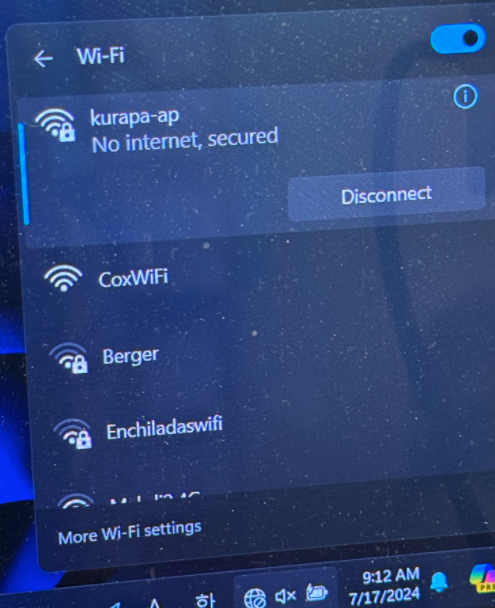
WiFi connection is established, but internet is not available on my Microsoft Windows Laptop - how to make it work?I

This issue is often due to DNS settings that need to be adjusted.

I also checked if network driver is malfunction or not - but it looks like normally working when I take a look at Device Manager:
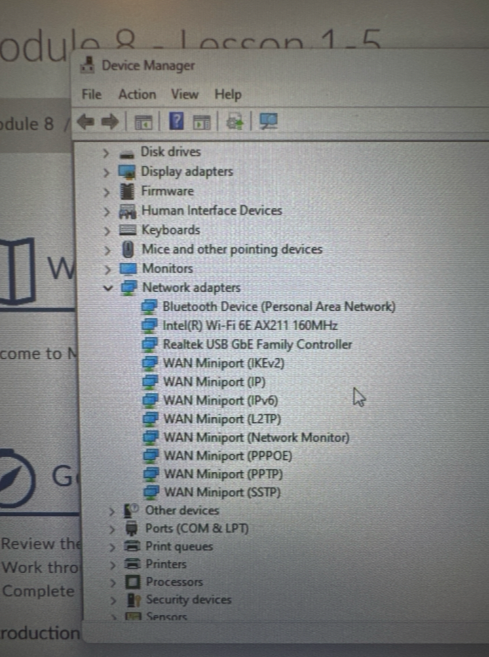
WiFi connection is established, but internet is not available on my Microsoft Windows Laptop - how to make it work?

Assuming the network driver is fine, the next step is to change the DNS settings. This can often resolve the problem. To do this, go to the Control Panel and open the Network and Sharing Center. Click on the WiFi network you are connected to, and then click on "Properties."

I just changed DNS settings by clicking "i" button
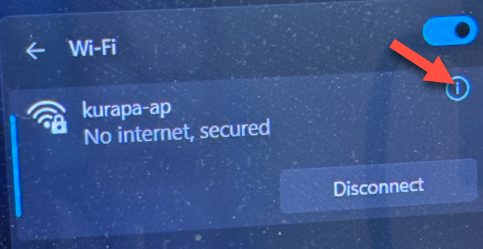
WiFi connection is established, but internet is not available on my Microsoft Windows Laptop - how to make it work?

In the properties window, scroll down and find "Internet Protocol Version 4 (TCP/IPv4)" and "Internet Protocol Version 6 (TCP/IPv6)." Select one of them and click on "Properties." Here, you will see an option to change the DNS settings.
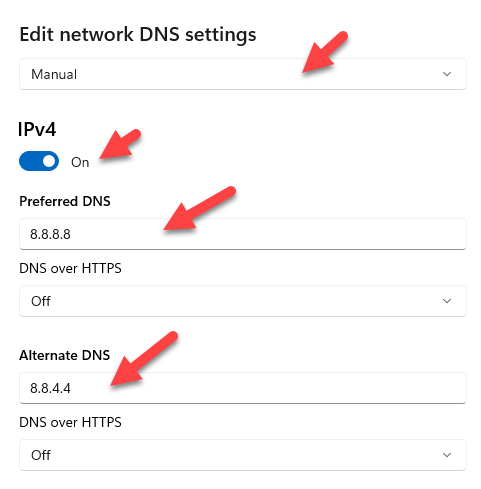
WiFi connection is established, but internet is not available on my Microsoft Windows Laptop - how to make it work?

WiFi connection is established, but internet is not available on my Microsoft Windows Laptop - how to make it work?

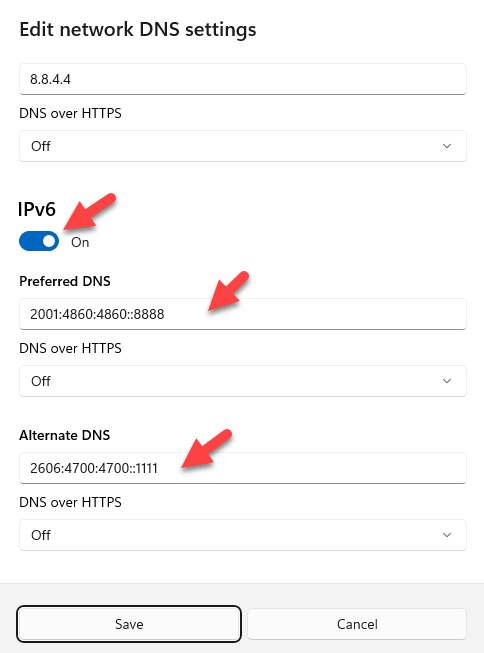
Select "Manual" at "Edit network DNS settings" and enter the new DNS addresses based on below:

For IPv4

  • Preferred DNS: 8.8.8.8
  • Alternate DNS: 1.1.1.1

For IPv6

  • Preferred DNS: 2001:4860:4860::8888
  • Alternate DNS: 2606:4700:4700::1111


After entering the new DNS addresses, click "Save" and close all the windows. Now, restart your laptop to apply the changes. Once your laptop restarts, check if the internet connection is now working. In many cases, changing the DNS settings resolves the issue of having a WiFi connection without internet access.


Possible reasons why your Windows laptop might have a WiFi connection but no internet access:

  • DNS Server Issues: The most common culprit is a problem with your DNS server. DNS (Domain Name System) translates website addresses into IP addresses, which your computer needs to access the internet. If your DNS settings are incorrect or your DNS server is down, you'll be able to connect to your WiFi but won't be able to browse the web.
  • Router or Modem Problems: A faulty router or modem can also cause this issue. Check if the router's lights are blinking normally and if it's properly connected to your modem.
  • Network Driver Issues: While you checked the Device Manager, it's possible the network driver is outdated or corrupted.
  • Firewall or Antivirus Software: Your firewall or antivirus software might be blocking internet access. Try temporarily disabling them to see if it resolves the problem.
  • Internet Service Provider (ISP) Outage: Your ISP might be experiencing an outage in your area, causing the internet to be unavailable.
  • WiFi Network Congestion: If many devices are connected to your WiFi network, it could cause slow internet speeds or connection drops.
  • IP Address Conflict: If your laptop is assigned the same IP address as another device on your network, it can prevent internet access.
  • Malware Infection: In rare cases, malware can interfere with your internet connection.

Things to try to fix the issue:

  • Restart your modem and router: This often fixes minor issues.
  • Run the Network Troubleshooter: Go to Settings > Network & Internet > Status > Network Troubleshooter.
  • Flush the DNS cache: Open Command Prompt as an administrator and type ipconfig /flushdns and press enter.
  • Update your network driver: Check for updates in Device Manager.
  • Temporarily disable your firewall and antivirus software: See if it resolves the issue.
  • Contact your ISP: They can help troubleshoot any issues on their end.
  • Check for any recent changes in your network settings: Revert any recent changes that might be causing the problem.
  • Check for malware: Run a full scan of your computer with your antivirus software.

Remember: It's important to be cautious when disabling security software and to re-enable it as soon as you've finished troubleshooting. If none of these solutions work, you may need to seek professional assistance.


Tags: DNS Domain Name Service Microsoft Windows Internet Connection Issue WiFi Connection Share on Facebook Share on X

◀ PREVIOUS
My windows memory usage is 51% even though I haven't ran any app - how to optimize?

▶ NEXT
Obstacles you should overcome for AdSense Approval

  Comments 0
SIMILAR POSTS

My windows memory usage is 51% even though I haven't ran any app - how to optimize?

(updated at )


OTHER POSTS IN THE SAME CATEGORY

Supply of EVs and Replacing Oil Demand

(updated at )

Digital Innovation Tools to Improve Health and Productivity in the Workplace

(updated at )

Virtual (VR), Augmented (AR) and Extended (XR) Real Market Status

(updated at )

Generative AI cannot scale without Responsible AI (RAI)

(updated at )

Harris And Trump's Position On the Future of American Science

(updated at )

Urban Extinction and Compact City

(updated at )

Rapidly Growing Humanoid Robot Industry with AI

(updated at )

Generative Artificial Intelligence Development Training Data Acquisition Emergency

(updated at )

Demand for AI and Electric-Differentiated Renewable Energy Surges

(updated at )

Starlink vs Cheon Beomseongjwa(千帆星座) Accelerates Competition for Low-Orbit Satellite Communications

(updated at )

AI and Exoskeleton Robots

(updated at )

Remember the book you read How does the world actually work

(updated at )

Extended Range Electric Vehicle (EREV) helps to reduce charging inconvenience and revolutionize long-distance driving

(updated at )

When is the oil peak?

(updated at )

Obstacles you should overcome for AdSense Approval

(updated at )

My windows memory usage is 51% even though I haven't ran any app - how to optimize?

(updated at )

Technical Secification for Schwinn Men's Trailway 700c/28" Hybrid Bike

(updated at )

Microsoft's On-Device AI: Revolutionizing Smart Technology and Redefining Innovation

(updated at )

ChatGPT Reset command and Ignore the Previous Response feature to have a Solid Result

(updated at )

ChatGPT Connectors makes the results Perfect as you expected

(updated at )

The difference between 403 and 404 in HTTP

(updated at )

Elon Musk Refutes Reports on Tesla's Low-Cost EV Plans: What's Really Happening?

(updated at )

Step-by-Step Guide: Developing Simple Games in Unity for Beginners

(updated at )

Unleashing Creativity with Unity: A Comprehensive Game Development Powerhouse

(updated at )

How solar chargers can power your home and wallet in Orange County

(updated at )

Revolutionizing Cycling - The Magic of Self-Sealing Bicycle Tires

(updated at )

Boost Your Wi-Fi Signal with a Wi-Fi Repeater

(updated at )

if exist statement in DOS

(created at )

Microsoft Windows commands frquently used

(updated at )

GPL aims to protect the four freedoms of free software

(updated at )

UPDATES

Harness vs. OpenClaw: Two Very Different "Agents"

(updated at )

Clean Python Environments: The Power of venv vs. Docker

(updated at )

What is Docker? Why is Docker also useful in a development environment?

(created at )

UIUC 2026-2027 Academic Calendar

(updated at )

How to Build Llama 3 AI Apps with Python: Setup & User Prompts

(updated at )

Open-Source LLMs: The AI Revolution

(updated at )

Resume 2.0: Leveling Up for My First Software Gig

(created at )

Not everyone will understand what this man just did

(created at )

UIUC Dorm Guide: Find Your Perfect Fit !!

(updated at )

Unpacking IU's Shopper

(created at )

Jackie Chan's Police Story: The Action Masterpiece

(updated at )

The IVE Story: Identity, 'I AM' Charts, and Influence

(updated at )

Tech Visionaries who graduated at UIUC - You are the Next Turn

(updated at )

Open Databases for Sex Crime Occurrences in the U.S.

(updated at )

Automatically copy text to the clipboard when dragging the mouse in the Cursor

(updated at )

My First Day at University of Illinois-Urvana Champaign

(updated at )

Sand, Sea, and a Splash of Fun at Newport Beach: A Family Adventure

(updated at )

Sun, Rocks, and Adventure: A Day at Joshua Tree National Park

(updated at )

Sipping the Stars: My Starbucks Adventure

(updated at )

Exciting explore at Sequoia National Park

(updated at )

My Life Shot at Death Valley

(updated at )

Ip Man fights with Muay Thai Master

(created at )

Mad Clown - Don't Die

(created at )

How to get Student Enrollment and Degree Verification at UIUC

(updated at )

LAX Thanksgiving Rush: A Joyful Reunion

(updated at )

ZO ZAZZ(조째즈) - Don`t you know (모르시나요) (PROD.ROCOBERRY)

(updated at )

FISHINGIRLS Unleashes Energetic EP 'Funiverse' Featuring Signature Track 'Fishing King'

(updated at )

10CM - To Reach You (너에게 닿기를)

(updated at )

Feeling weak? Transform yourself at the UIUC ARC!

(updated at )

BOYNEXTDOOR - If I Say I Love You

(updated at )

The Future of Software Engineer - AI Engineering

(updated at )

G Dragon x Taeyang (Eyes Nose Lips, Power, Home Sweet Home, GOOD BOY) - LE GALA PIÈCES JAUNES 2025

(updated at )

Lie - Legend song by BIGBANG

(updated at )

Why ROLLBACK is useful when you work with Google Gemini CLI?

(created at )

Reimbursement after Vaccination at McKinley Health Center

(created at )

Gemini CLI makes a Magic! Time to speed up your app development with Google Gemini CLI!

(created at )

Common Questions from UIUC school life in terms of CS Program

(created at )

UIUC Immunization Compliance

(created at )

LEE CHANHYUK's songs really resonate with my soul - Time Stop! Vivid LaLa Love, Eve, Endangered Love ...

(created at )

LEE CHANHYUK - Endangered Love (멸종위기사랑)

(created at )

Cupid (OT4/Twin Ver.) - LIVE IN STUDIO | FIFTY FIFTY (피프티피프티)

(created at )

Common methods to improve coding skills

(created at )

US National Holiday in 2026

(created at )

BABYMONSTER “WE GO UP” Band LIVE [it's Live] K-POP live music show

(created at )

BLACKPINK - ‘Shut Down’ Live at Coachella 2023

(created at )

JENNIE - like JENNIE - One of Hot K-POP in 2025

(created at )

BABYMONSTER(베이비몬스터) - DRIP + HOT SOURCE + SHEESH

(created at )

Common Naming Format in Software Development

(created at )

In a life where I don't want to spill even a single sip of champagne - LEE CHANHYUK - Panorama(파노라마)

(created at )

Countries with more males and females - what about UIUC?

(created at )