My windows memory usage is 51% even though I haven't ran any app - how to optimize?

JK1982 
Created at
Updated at  

  7,217   0   0  

I was curious whether my laptop is damaged by unknown reason or not, because its memory usage is 51% even though I haven't ran any app.

The reason why I thought like that was because my laptop network was sometimes malfunction even though the Wifi connection was successfully established. Later, it turned out that was caused by abnormal behavior of DHCP for DNS(Domain Name Service). To make long story short, the network issue was different issue and caused by Cox.

By the way, below is the captured screen for my task maanager on Microsoft Windows.
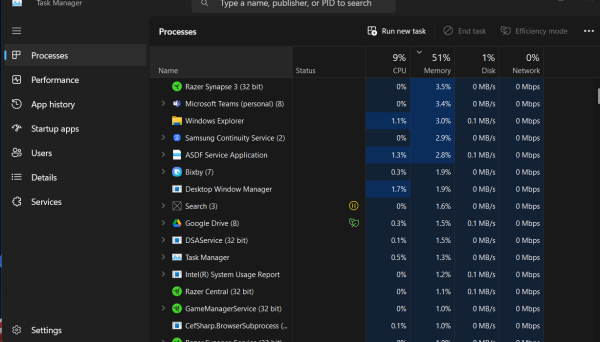
My windows memory usage is 51% even though I haven't ran any app - how to optimize?

I had some research if above is really a normal and learned following information:

A memory usage of 51% on a Windows system without actively running applications can be normal depending on several factors such as the total amount of RAM installed, the number of background processes and services running, and the operating system's memory management behavior.

Here are some steps to minimize memory usage:

  1. Check Startup Programs:
    • Press Ctrl + Shift + Esc to open Task Manager.
    • Go to the "Startup" tab.
    • Disable any unnecessary programs that start with Windows.
  2. Check Background Processes:
    • In Task Manager, under the "Processes" tab, check for background processes using significant memory.
    • Identify and close unnecessary processes.
  3. Adjust Visual Effects:
    • Right-click on "This PC" or "Computer" on the desktop or in File Explorer.
    • Select "Properties" → "Advanced system settings."
    • Under the "Performance" section, click "Settings."
    • Select "Adjust for best performance" or customize which visual effects to disable.
  4. Reduce Running Services:
    • Press Win + R, type msconfig, and press Enter.
    • Go to the "Services" tab.
    • Check "Hide all Microsoft services" to avoid disabling essential services.
    • Disable any unnecessary third-party services.
  5. Uninstall Unnecessary Programs:
    • Go to "Control Panel" → "Programs" → "Programs and Features."
    • Uninstall programs you no longer use or need.
  6. Update Windows and Drivers:
    • Ensure your Windows and drivers are up to date, as updates can include performance improvements and bug fixes.
  7. Scan for Malware:
    • Use a reputable antivirus or antimalware program to scan for and remove any malware that might be using system resources.
  8. Increase Virtual Memory:
    • Right-click on "This PC" or "Computer" → "Properties."
    • Select "Advanced system settings" → "Settings" under the Performance section.
    • Go to the "Advanced" tab and click "Change" under Virtual memory.
    • Adjust the size of the paging file to improve performance.

If you've tried these steps and are still experiencing high memory usage, providing additional details such as the amount of installed RAM and specific background processes using memory might help in diagnosing the issue further.


Tags: DNS Domain Name Service Microsoft Windows Microsoft Windows Memory Usage Microsoft Windows Optimization Microsoft Windows RAM Random Access Memory Share on Facebook Share on X

◀ PREVIOUS
Technical Secification for Schwinn Men's Trailway 700c/28" Hybrid Bike

▶ NEXT
WiFi connection is established, but internet is not available on my Microsoft Windows Laptop - how to make it work?

  Comments 0
SIMILAR POSTS

WiFi connection is established, but internet is not available on my Microsoft Windows Laptop - how to make it work?

(updated at )

Microsoft's On-Device AI: Revolutionizing Smart Technology and Redefining Innovation

(updated at )


OTHER POSTS IN THE SAME CATEGORY

Digital Innovation Tools to Improve Health and Productivity in the Workplace

(updated at )

Virtual (VR), Augmented (AR) and Extended (XR) Real Market Status

(updated at )

Generative AI cannot scale without Responsible AI (RAI)

(updated at )

Harris And Trump's Position On the Future of American Science

(updated at )

Urban Extinction and Compact City

(updated at )

Rapidly Growing Humanoid Robot Industry with AI

(updated at )

Generative Artificial Intelligence Development Training Data Acquisition Emergency

(updated at )

Demand for AI and Electric-Differentiated Renewable Energy Surges

(updated at )

Starlink vs Cheon Beomseongjwa(千帆星座) Accelerates Competition for Low-Orbit Satellite Communications

(updated at )

AI and Exoskeleton Robots

(updated at )

Remember the book you read How does the world actually work

(updated at )

Extended Range Electric Vehicle (EREV) helps to reduce charging inconvenience and revolutionize long-distance driving

(updated at )

When is the oil peak?

(updated at )

Obstacles you should overcome for AdSense Approval

(updated at )

WiFi connection is established, but internet is not available on my Microsoft Windows Laptop - how to make it work?

(updated at )

Technical Secification for Schwinn Men's Trailway 700c/28" Hybrid Bike

(updated at )

Microsoft's On-Device AI: Revolutionizing Smart Technology and Redefining Innovation

(updated at )

ChatGPT Reset command and Ignore the Previous Response feature to have a Solid Result

(updated at )

ChatGPT Connectors makes the results Perfect as you expected

(updated at )

The difference between 403 and 404 in HTTP

(updated at )

Elon Musk Refutes Reports on Tesla's Low-Cost EV Plans: What's Really Happening?

(updated at )

Step-by-Step Guide: Developing Simple Games in Unity for Beginners

(updated at )

Unleashing Creativity with Unity: A Comprehensive Game Development Powerhouse

(updated at )

How solar chargers can power your home and wallet in Orange County

(updated at )

Revolutionizing Cycling - The Magic of Self-Sealing Bicycle Tires

(updated at )

Boost Your Wi-Fi Signal with a Wi-Fi Repeater

(updated at )

if exist statement in DOS

(created at )

Microsoft Windows commands frquently used

(updated at )

GPL aims to protect the four freedoms of free software

(updated at )

Key Features of the Apache License

(updated at )

UPDATES

Harness vs. OpenClaw: Two Very Different "Agents"

(updated at )

Clean Python Environments: The Power of venv vs. Docker

(updated at )

What is Docker? Why is Docker also useful in a development environment?

(created at )

UIUC 2026-2027 Academic Calendar

(updated at )

How to Build Llama 3 AI Apps with Python: Setup & User Prompts

(updated at )

Open-Source LLMs: The AI Revolution

(updated at )

Resume 2.0: Leveling Up for My First Software Gig

(created at )

Not everyone will understand what this man just did

(created at )

UIUC Dorm Guide: Find Your Perfect Fit !!

(updated at )

Unpacking IU's Shopper

(created at )

Jackie Chan's Police Story: The Action Masterpiece

(updated at )

The IVE Story: Identity, 'I AM' Charts, and Influence

(updated at )

Tech Visionaries who graduated at UIUC - You are the Next Turn

(updated at )

Open Databases for Sex Crime Occurrences in the U.S.

(updated at )

Automatically copy text to the clipboard when dragging the mouse in the Cursor

(updated at )

My First Day at University of Illinois-Urvana Champaign

(updated at )

Sand, Sea, and a Splash of Fun at Newport Beach: A Family Adventure

(updated at )

Sun, Rocks, and Adventure: A Day at Joshua Tree National Park

(updated at )

Sipping the Stars: My Starbucks Adventure

(updated at )

Exciting explore at Sequoia National Park

(updated at )

My Life Shot at Death Valley

(updated at )

Ip Man fights with Muay Thai Master

(created at )

Mad Clown - Don't Die

(created at )

How to get Student Enrollment and Degree Verification at UIUC

(updated at )

LAX Thanksgiving Rush: A Joyful Reunion

(updated at )

ZO ZAZZ(조째즈) - Don`t you know (모르시나요) (PROD.ROCOBERRY)

(updated at )

FISHINGIRLS Unleashes Energetic EP 'Funiverse' Featuring Signature Track 'Fishing King'

(updated at )

10CM - To Reach You (너에게 닿기를)

(updated at )

Feeling weak? Transform yourself at the UIUC ARC!

(updated at )

BOYNEXTDOOR - If I Say I Love You

(updated at )

The Future of Software Engineer - AI Engineering

(updated at )

G Dragon x Taeyang (Eyes Nose Lips, Power, Home Sweet Home, GOOD BOY) - LE GALA PIÈCES JAUNES 2025

(updated at )

Lie - Legend song by BIGBANG

(updated at )

Why ROLLBACK is useful when you work with Google Gemini CLI?

(created at )

Reimbursement after Vaccination at McKinley Health Center

(created at )

Gemini CLI makes a Magic! Time to speed up your app development with Google Gemini CLI!

(created at )

Common Questions from UIUC school life in terms of CS Program

(created at )

UIUC Immunization Compliance

(created at )

LEE CHANHYUK's songs really resonate with my soul - Time Stop! Vivid LaLa Love, Eve, Endangered Love ...

(created at )

LEE CHANHYUK - Endangered Love (멸종위기사랑)

(created at )

Cupid (OT4/Twin Ver.) - LIVE IN STUDIO | FIFTY FIFTY (피프티피프티)

(created at )

Common methods to improve coding skills

(created at )

US National Holiday in 2026

(created at )

BABYMONSTER “WE GO UP” Band LIVE [it's Live] K-POP live music show

(created at )

BLACKPINK - ‘Shut Down’ Live at Coachella 2023

(created at )

JENNIE - like JENNIE - One of Hot K-POP in 2025

(created at )

BABYMONSTER(베이비몬스터) - DRIP + HOT SOURCE + SHEESH

(created at )

Common Naming Format in Software Development

(created at )

In a life where I don't want to spill even a single sip of champagne - LEE CHANHYUK - Panorama(파노라마)

(created at )

Countries with more males and females - what about UIUC?

(created at )