Types of Memory and Storage

JK 2002 
Created at
Updated at  
7,396 0 0

Computer memory, in its simplest form, is any physical electronic component that stores information for immediate use in a computer. It's like the computer's short-term and medium-term workspace where it keeps the data and instructions it actively needs. Think of it as your brain's working memory – the information you're actively thinking about right now.
Without memory, a computer can't do anything. It needs memory to:

  • Store the operating system: The software that controls the computer's basic functions.
  • Store applications: Programs like your web browser, word processor, or games.
  • Store data being processed: The information you're working on, like a document you're editing or a website you're browsing.
  • Store temporary results: Intermediate calculations or data manipulations that the computer needs for the next step.

Computer memory is generally characterized by:

  • Volatility: Whether the data is lost when power is turned off (volatile) or remains stored (non-volatile).
  • Speed: How quickly data can be accessed (faster is better).
  • Capacity: How much data it can hold (more is better).
  • Cost: Faster, larger, and non-volatile memory typically costs more.

Types of Computer Memory and Storage on Earth
There are many different types of computer memory and storage, each with its own characteristics and applications. Here's a breakdown of the major categories:
1. Primary Memory (Main Memory): Directly accessible by the CPU

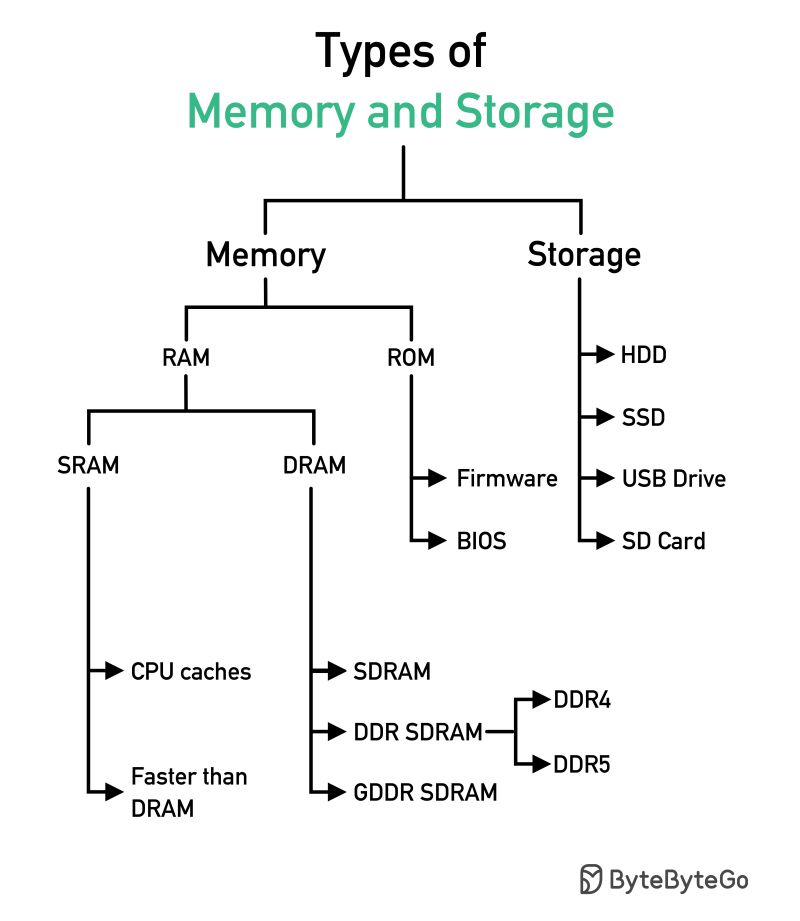
  • RAM (Random Access Memory): *Volatile, fast, and relatively expensive.* This is the computer's main working memory.
    • DRAM (Dynamic RAM): The most common type of RAM. Needs to be constantly refreshed to retain data. Examples include DDR4, DDR5 (the latest standards).
    • SRAM (Static RAM): Faster and more expensive than DRAM. Uses latches instead of capacitors, so it doesn't need constant refreshing. Used in CPU caches.
  • ROM (Read-Only Memory): *Non-volatile.* Contains firmware, such as the BIOS (Basic Input/Output System), which is essential for booting up the computer. ROM is *usually* read-only, but some types can be programmed (though not easily).
    • PROM (Programmable ROM): Can be written to once.
    • EPROM (Erasable Programmable ROM): Can be erased using ultraviolet light and then reprogrammed.
    • EEPROM (Electrically Erasable Programmable ROM): Can be erased and reprogrammed electrically. Flash memory (see below) is a type of EEPROM.

2. Secondary Storage (External Storage): Persistent storage for data and programs

  • Magnetic Storage: *Non-volatile.* Stores data by magnetizing a thin film on a disk or tape.
    • Hard Disk Drives (HDDs): Rotating platters coated with magnetic material. Relatively cheap but slower than solid-state drives. Still commonly used for large storage needs.
    • Magnetic Tape: Used for archival storage and backups. Very high capacity, but access is sequential, making it slow for random access.
  • Optical Storage: *Non-volatile.* Stores data using lasers to read and write patterns on a reflective surface.
    • CD-ROM (Compact Disc Read-Only Memory): Read-only optical disc.
    • CD-R (Compact Disc Recordable): Can be written to once.
    • CD-RW (Compact Disc Rewritable): Can be written to and erased multiple times.
    • DVD (Digital Versatile Disc): Higher capacity than CDs. Also available in ROM, R, and RW formats.
    • Blu-ray Disc: Even higher capacity than DVDs. Also available in ROM, R, and RW formats.
  • Solid-State Storage: *Non-volatile.* Stores data electronically in semiconductor memory cells. No moving parts, making them faster and more durable than magnetic storage.
    • Solid-State Drives (SSDs): Uses NAND flash memory. Much faster than HDDs. Becoming the standard for laptops and desktops.
    • USB Flash Drives (Thumb Drives): Small, portable solid-state storage devices.
    • Memory Cards (SD Cards, MicroSD Cards, etc.): Used in digital cameras, smartphones, and other portable devices.
    • eMMC (Embedded MultiMediaCard): A type of flash memory commonly used in smartphones, tablets, and other embedded systems.
  • Other Emerging Storage Technologies:
    • 3D NAND Flash: Stacks multiple layers of flash memory cells vertically to increase density and capacity.
    • ReRAM (Resistive Random-Access Memory): A non-volatile memory technology that uses changes in resistance to store data. Promising faster speeds and lower power consumption.
    • MRAM (Magnetoresistive Random-Access Memory): Uses magnetic storage elements. Non-volatile, fast, and low power.
    • PCM (Phase-Change Memory): Stores data by changing the phase of a chalcogenide material (between amorphous and crystalline states). Fast and non-volatile.
    • DNA Storage: Stores data in synthetic DNA strands. Extremely high density, but slow access times and high cost are current limitations.
    • Holographic Storage: Stores data as interference patterns within a holographic material. Potential for very high density and fast transfer rates.

Key Differences and Trade-offs

  • Speed vs. Capacity: Faster memory (like RAM and SSDs) tends to be more expensive and have lower capacity compared to slower storage (like HDDs and tape).
  • Volatility vs. Persistence: RAM is volatile (loses data when power is off), while secondary storage (HDDs, SSDs, optical discs, etc.) is non-volatile (retains data).
  • Cost: The cost per gigabyte varies greatly between different types of memory and storage.


The material below from Alex Yu is a great resource that is very easy to understand.
 

Types of Memory and Storage


Tags CPU Caches Computer Memory Computer Storage DDR SDRAM DDR4 DRAM EEPROM EPROM GDDR SDRAM PROM RAM ROM SDRAM SRAM Facebook X
Comments 0
Similar posts
  1. The Magic of High School Prom aka Promnade Dance
    7,371
  1. Bootstrap vs. Tailwind CSS: Origins, Features, Pros & Cons, and How to Choose the Right Framework
    16
  2. Telemetry vs. Analytics: Understanding the Difference and Why It Matters
    157
  3. The Evolution and Production Reality of Agentic AI
    155
  4. Complete Guide to Building a Machine Learning Model
    276
  5. The Cybercab Transformation: From Autonomous Taxi to Mobile Base Station
    298
  6. Harness vs. OpenClaw: Two Very Different "Agents"
    878
  7. What is Docker? Why is Docker also useful in a development environment?
    576
  8. Open-Source LLMs: The AI Revolution
    697
  9. Open Databases for Sex Crime Occurrences in the U.S.
    667
  10. Automatically copy text to the clipboard when dragging the mouse in the Cursor
    2,483
  11. The Future of Software Engineer - AI Engineering
    902
  12. Why ROLLBACK is useful when you work with Google Gemini CLI?
    791
  13. Gemini CLI makes a Magic! Time to speed up your app development with Google Gemini CLI!
    932
  14. Common Naming Format in Software Development
    2,462
  15. How to access websites blocked by ESNI and ECH settings with Firefox!
    10,139
  16. Block unwanted URLs for comfortable web browsing with Chrome Addon - URL Blocker
    7,571
  17. Modern Web Indexing Technology - IndexNow
    7,376
  18. Key Differences in Gen Z/Alpha/Zalpha based on Upbringing and Life Experiences
    8,087
  19. Zalpha: A Global Trend, Not Just a Distant Concept
    7,693
  20. Zalpha Generation: A New Term for the Children of Gen Z and Millennials
    7,755
  21. The Generation Corona (+ Gen Z) is grappling with how to communicate and live alongside Gen Alpha
    8,024
  22. Starship, Super Heavy, Successful Ground Landing
    7,576
  23. Difference in HEAD and GET for HTTP Request - why HEAD Request could be used for DDoS Attack?
    10,200
  24. Understanding the Key Differences Between GIS and LBS: Purpose, Technology, and Applications
    7,266
  25. The Evolution and Applications of Geographic Information Systems: From Thematic Mapping to Efficient Data Analysis and Management
    7,190
  26. Japan's Current Status on Generative AI and Copyright: A Summary of Developments, Current Situation, and Key Issues
    7,772
  27. Quantum computer and qubit generation method
    7,246
  28. Why Two Path Authentication is Essential - My Microsoft Account is Gone!
    8,230
  29. The UN Pushes for Global AI Standards
    7,168
Recently updated
  1. Bootstrap vs. Tailwind CSS: Origins, Features, Pros & Cons, and How to Choose the Right Framework
    16
  2. Telemetry vs. Analytics: Understanding the Difference and Why It Matters
    157
  3. The Evolution and Production Reality of Agentic AI
    155
  4. How to Activate or Waive Your UIUC Student Health Insurance
    230
  5. Complete Guide to Building a Machine Learning Model
    276
  6. My life cuts at Las Vegas during Thanksgiving day holiday
    7,358
  7. The Cybercab Transformation: From Autonomous Taxi to Mobile Base Station
    298
  8. Harness vs. OpenClaw: Two Very Different "Agents"
    878
  9. Clean Python Environments: The Power of venv vs. Docker
    753
  10. What is Docker? Why is Docker also useful in a development environment?
    576
  11. UIUC 2026-2027 Academic Calendar
    1,443
  12. How to Build Llama 3 AI Apps with Python: Setup & User Prompts
    752
  13. Open-Source LLMs: The AI Revolution
    697
  14. Resume 2.0: Leveling Up for My First Software Gig
    2,027
  15. Not everyone will understand what this man just did
    1,684
  16. UIUC Dorm Guide: Find Your Perfect Fit !!
    1,530
  17. Unpacking IU's Shopper
    697
  18. Jackie Chan's Police Story: The Action Masterpiece
    593
  19. The IVE Story: Identity, 'I AM' Charts, and Influence
    892
  20. Tech Visionaries who graduated at UIUC - You are the Next Turn
    1,137
  21. Open Databases for Sex Crime Occurrences in the U.S.
    667
  22. Automatically copy text to the clipboard when dragging the mouse in the Cursor
    2,483
  23. My First Day at University of Illinois-Urvana Champaign
    1,149
  24. Sand, Sea, and a Splash of Fun at Newport Beach: A Family Adventure
    8,076
  25. Sun, Rocks, and Adventure: A Day at Joshua Tree National Park
    8,150
  26. Sipping the Stars: My Starbucks Adventure
    9,553
  27. Exciting explore at Sequoia National Park
    7,611
  28. My Life Shot at Death Valley
    1,606
  29. Ip Man fights with Muay Thai Master
    891
  30. Mad Clown - Don't Die
    964
  31. How to get Student Enrollment and Degree Verification at UIUC
    4,613
  32. LAX Thanksgiving Rush: A Joyful Reunion
    888
  33. ZO ZAZZ(조째즈) - Don`t you know (모르시나요) (PROD.ROCOBERRY)
    1,074
  34. FISHINGIRLS Unleashes Energetic EP 'Funiverse' Featuring Signature Track 'Fishing King'
    933
  35. 10CM - To Reach You (너에게 닿기를)
    1,111
  36. Feeling weak? Transform yourself at the UIUC ARC!
    1,539
  37. BOYNEXTDOOR - If I Say I Love You
    1,146
  38. The Future of Software Engineer - AI Engineering
    902
  39. G Dragon x Taeyang (Eyes Nose Lips, Power, Home Sweet Home, GOOD BOY) - LE GALA PIÈCES JAUNES 2025
    872
  40. Lie - Legend song by BIGBANG
    7,782
  41. Why ROLLBACK is useful when you work with Google Gemini CLI?
    791
  42. Reimbursement after Vaccination at McKinley Health Center
    968
  43. Gemini CLI makes a Magic! Time to speed up your app development with Google Gemini CLI!
    932
  44. Common Questions from UIUC school life in terms of CS Program
    1,064
  45. UIUC Immunization Compliance
    1,159
  46. LEE CHANHYUK's songs really resonate with my soul - Time Stop! Vivid LaLa Love, Eve, Endangered Love ...
    1,054
  47. LEE CHANHYUK - Endangered Love (멸종위기사랑)
    1,053
  48. Cupid (OT4/Twin Ver.) - LIVE IN STUDIO | FIFTY FIFTY (피프티피프티)

    838
  49. Common methods to improve coding skills
    952
  50. US National Holiday in 2026
    867