| Canvas is the Learning Management System (LMS) used at UIUC. Think of it as a central online location where instructors manage their courses and where students access all the materials and tools they need to succeed. It's much more than just a place to submit assignments; it's a vital communication and organization tool. Improve Time Management with the UIUC Canvas Dashboard's Chronological Assignment ViewThe UIUC Canvas Dashboard shows assignments in chronological order, which helps you manage your time effectively. Click “Dashboard” → Dashboard View → List View 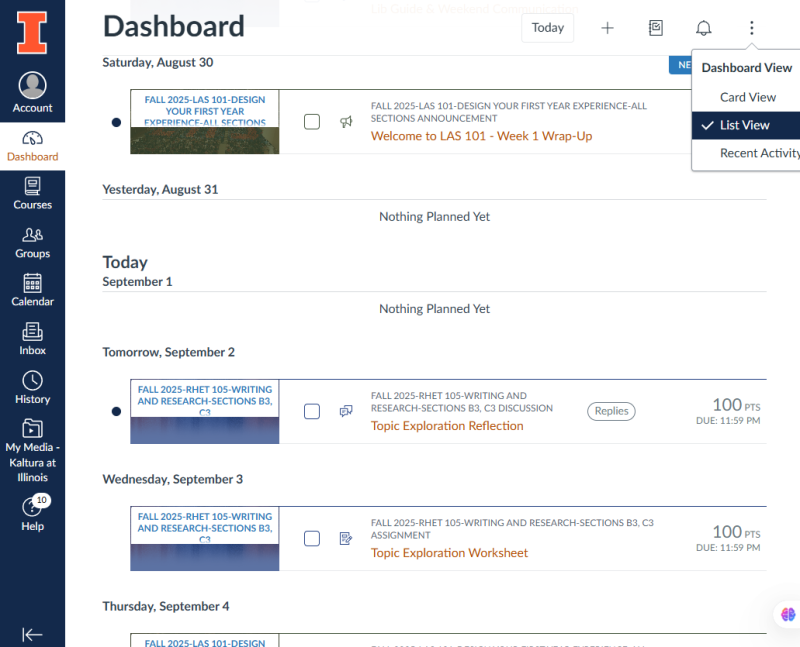
Why Canvas is Useful for Assignments and Exams 1. Clear and Centralized Assignment Information:- Detailed Instructions: For every assignment (homework, projects, essays, etc.), Canvas provides a dedicated page with comprehensive instructions. This typically includes:
- Specific Requirements: What the assignment is asking you to do, the specific questions to answer, the tasks to complete, or the problem to solve.
- Formatting Guidelines: Font size, margins, file types to submit (e.g., PDF, .docx), naming conventions for files.
- Length Requirements: Page limits, word counts, or minimum/maximum line numbers.
- Grading Rubrics: This is *extremely* important. The rubric outlines the criteria the instructor will use to evaluate your work. It breaks down the points awarded for each aspect of the assignment (e.g., content, organization, grammar, analysis). Knowing the rubric *before* you start the assignment helps you focus your efforts on the areas that matter most to the instructor.
- Examples: Sometimes, instructors will provide example assignments or model answers to illustrate what they're looking for.
- Due Dates and Times: Canvas prominently displays the due date and *exact* time for each assignment. It also often provides reminders as the deadline approaches (via email or notifications). This is crucial for staying organized and avoiding late submissions.
- Submission Methods: Canvas clearly indicates how you should submit your work:
- Online Submission: You'll upload your file directly to Canvas.
- Turnitin Integration: Many courses use Turnitin through Canvas to check for plagiarism. Canvas will automatically submit your work to Turnitin and provide you with a similarity report.
- In-Class Submission: Some assignments may require you to physically hand in your work during class. Canvas will still provide the instructions, even if the submission isn't online.
- Late Submission Policies: The syllabus is also found in Canvas, and professors will often mention their late submission policies there. Canvas allows you to submit, but the grade will be automatically deducted.
2. Exam Information and Resources:- Exam Dates, Times, and Locations: Canvas will list the dates, times, and locations of all exams (midterms, finals, etc.). This helps you plan your study schedule. For online exams, the start and end times will be clearly defined.
- Exam Format: The instructor will often provide details about the format of the exam:
- Types of Questions: Multiple choice, true/false, short answer, essay questions, problem-solving, coding.
- Number of Questions: How many questions of each type to expect.
- Point Values: The point value for each question or section of the exam.
- Content Covered: A clear outline of the topics and materials that will be covered on the exam. This might include specific chapters from the textbook, lecture notes, readings, or concepts.
- Study Guides and Practice Materials: Many instructors will post study guides, practice exams, or sample questions on Canvas to help you prepare for exams.
- Allowed Resources: Canvas indicates what resources (if any) you are allowed to use during the exam:
- Open Book/Open Note: Whether you can use your textbook, notes, or other materials.
- Calculators: Whether calculators are permitted (and if so, what type).
- Formula Sheets: Whether the instructor will provide a formula sheet or if you need to create your own.
- Online Exam Settings: For online exams, Canvas controls several settings:
- Time Limit: The amount of time you have to complete the exam.
- Question Presentation: One question at a time or all questions on one page.
- Navigation: Whether you can go back to previous questions.
- Proctoring: Some online exams may use proctoring software (e.g., ProctorU) that monitors you during the exam to prevent cheating. Information about proctoring will be provided on Canvas.
3. Gradebook and Feedback:- Grade Tracking: Canvas's gradebook allows you to track your grades on all assignments and exams throughout the semester. You can see your score on each assignment and the course's overall grade (as it's being calculated).
- Instructor Feedback: Instructors can provide feedback on your assignments directly within Canvas. This might include:
- Written Comments: Explanations of why you lost points, suggestions for improvement, and praise for good work.
- Annotations: Direct annotations on your submitted document (e.g., highlighting errors, adding comments to specific sections).
- Audio/Video Feedback: Some instructors may provide audio or video feedback, which can be more personalized and easier to understand.
- Grade Distribution: Some instructors may choose to show the class's grade distribution on an assignment or exam. This gives you an idea of how well you performed compared to your peers.
4. Communication and Announcements:- Announcements: Instructors use Canvas announcements to communicate important information to the entire class. This might include:
- Changes to the syllabus or schedule.
- Reminders about upcoming deadlines.
- Clarifications about assignment instructions.
- Important updates about the course.
- Discussions: Canvas discussion forums provide a space for students to interact with each other and the instructor. You can ask questions, share ideas, and collaborate on projects.
- Direct Messaging: You can use Canvas to send direct messages to the instructor or other students in the course.
Canvas is a crucial tool for staying organized and informed about your assignments and exams at UIUC. It provides a central location for all the information you need, from detailed instructions and grading rubrics to due dates and feedback. Regularly checking Canvas is essential for academic success. It centralizes and streamlines all academic interactions and information.
By taking full advantage of Canvas, you can: - Understand the requirements for each assignment.
- Stay on top of deadlines.
- Track your grades.
- Receive feedback from your instructor.
- Communicate with your classmates.
How do I connect to UIUC Canvas?https://canvas.illinois.edu 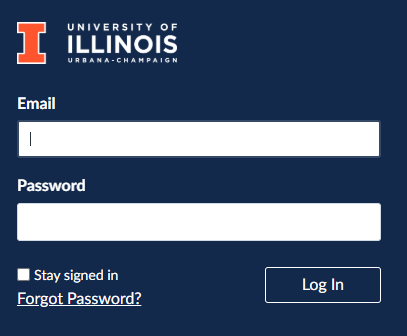
|